
- ScreenRecording auf dem iPhone aufnehmen
- iMovie laden
- Ablage > Neue App Vorschau
- Screen-Recording-Video reinziehen
- Teilen > App Vorschau
Schlagwort: ios
iOS Simulator – Video aufnehmen
xcrun simctl io booted recordVideo appVideo.movCode-Sprache: CSS (css)XCode Library not found
Das hängt meistens damit zusammen, das man anstelle der Workspacedatei die Xcode-Projektdatei ohne Dependencies geöffnet hat!
iOS Simulator + Charles Web Debugging Proxy
Um SSL Datenverkehr aus dem iOS Simulator auf dem Charles Web Debugging Proxy zu monitoren muss das Charles Zertifikat auf dem Simulator als „vertrauenswürdig“ eingestellt werden.
Dafür speichert man das Zertifikat auf dem Rechner und zieht es danach auf den Simulator
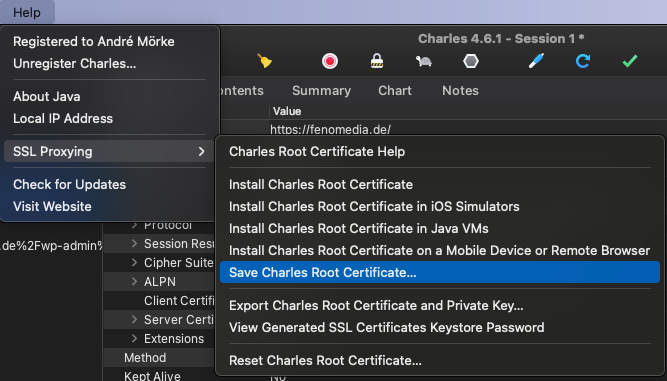
Wichtig: Wenn das Zertifikat abgelaufen Seitn sollte, muss man über „Reset Charles Root Certificate…“ im gleichen Menü ein neues erstellen und auf alle Clients aktualisieren!
A valid provisioning profile for this executable was not found
Wenn das Problem auftritt, muss in den Project Setting das Build System von „New Build System“ auf „Legacy Build System“ umgestellt werden:
Xcode 10: A valid provisioning profile for this executable was not found
Xcode 10: A valid provisioning profile for this executable was not found

Since yesterday I’ve been getting the following error when trying run an app on my device: „A valid provisioning profile for this executable was not found.“. This is after updating to Xcode 10. Bui…
Xcode has conflicting provisioning settings
Die Lösung ist unter Project Target > Build Settings > Suchfenster nacht PROVISIONING_PROFILE zu suchen und alle Profile zu löschen.
Xcode has conflicting provisioning settings
Xcode has conflicting provisioning settings
I have an Ionic 2 app, which builds and is testable in Xcode 8.2.1 Simulator environment, e.g. iPhone7 (Build Successful). When I try Archive the app to create an ipa file to set on a device, I fo…
Source: https://stackoverflow.com/questions/42885122/xcode-has-conflicting-provisioning-settings#53957176
Cordova Apps und iOS Bounce Effekt
Seit iOS 11.3 sind alle Apps mit einem Bounce-Effekt beim scrollen versehen. Das wirkt sicht negativ auf Cordova-Apps aus, da diese nur im Webview scrollen sollen.
Dafür muss in der config.xml von Cordova folgendes eingefügt werden:
<preference name="DisallowOverscroll" value="true" />
<preference name="UIWebViewBounce" value="false" />
Danach muss die App mit cordova build ios neu kompiliert werden.
Disable iOS Scroll Bounce/OverScroll in Cordova Apps | Mahdi Hazaveh
Disable iOS Scroll Bounce/OverScroll in Cordova Apps | Mahdi Hazaveh

Source: hazaveh.net/2018/02/disable-ios-scroll-bounce-overscroll-in-cordova-apps/
XCode – iOS App startet nicht auf Gerät
Kürzlich der Fall: Im XCode ließ sich die App nach erfolgreichem Build nicht auf dem Endgerät starten.
Dafür folgenden Move machen:
- Im XCode in der oberen Toolbar zwei Buttons neben dem Run-Button das Aktive Schema öffnen
- Auf Edit Scheme gehen
- Im folgenden Dialog den Bereich Run auswählen
- Als Executable die App auswählen
Voila, die App startet nach dem Build auch auf dem Device.