
CREATE EVENT IF NOT EXISTS one_time_log
ON SCHEDULE AT CURRENT_TIMESTAMP
DO
INSERT INTO messages(message) VALUES('One-time event');Schlagwort: sql
JOINs in SQL
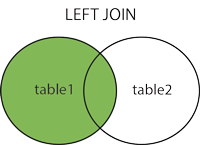
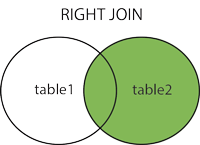
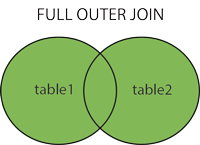
(INNER) JOIN: Returns records that have matching values in both tablesLEFT (OUTER) JOIN: Returns all records from the left table, and the matched records from the right tableRIGHT (OUTER) JOIN: Returns all records from the right table, and the matched records from the left tableFULL (OUTER) JOIN: Returns all records when there is a match in either left or right table

UID für MySQL
<code>SELECT UUID();</code>Code-Sprache: HTML, XML (xml)MySQL hat dafür eine eigene Funktion.
Entfernung über SQL
Über die Haversine Formel kann man sich für latitude und longitude Werte die Entfernung per SQL ausrechnen lassen:
SELECT *, (((acos(sin(([LATITUDE]*pi()/180)) * sin((`lat`*pi()/180)) + cos(([LATITUDE]*pi()/180)) * cos((`lat`*pi()/180)) * cos((([LONGITUDE]- `lng`) * pi()/180)))) * 180/pi()) * 60 * 1.1515 * 1.609344) as distance
FROM [TABLE] HAVING distance<4 ORDER BY distanceSQL – Dump per PHP erstellen
/* backup the db OR just a table */
function backup_tables($host,$user,$pass,$name,$folder,$tables = '*')
{
    $return = '';
    $link = mysql_connect($host,$user,$pass);
    mysql_select_db($name,$link);

    //get all of the tables
    if($tables == '*')
    {
        $tables = array();
        $result = mysql_query('SHOW TABLES');
        while($row = mysql_fetch_row($result))
        {
            $tables[] = $row[0];
        }
    }
    else
    {
        $tables = is_array($tables) ? $tables : explode(',',$tables);
    }

    //cycle through
    foreach($tables as $table)
    {
        $result = mysql_query('SELECT * FROM '.$table);
        $num_fields = mysql_num_fields($result);

        $return.= 'DROP TABLE '.$table.';';
        $row2 = mysql_fetch_row(mysql_query('SHOW CREATE TABLE '.$table));
        $return.= "\n\n".$row2[1].";\n\n";

        for ($i = 0; $i < $num_fields; $i++)
        {
            while($row = mysql_fetch_row($result))
            {
                $return.= 'INSERT INTO '.$table.' VALUES(';
                for($j=0; $j<$num_fields; $j++)
                {
                    if($row[$j] !== NULL){
                        $row[$j] = addslashes($row[$j]);
                        $row[$j] = ereg_replace("\n","\\n",$row[$j]);
                        if (isset($row[$j])) { $return.= '"'.$row[$j].'"' ; } else { $return.= '""'; }
                    }else{
                        $return .= "NULL";
                    }
                    if ($j<($num_fields-1)) { $return.= ','; }
                }
                $return.= ");\n";
            }
        }
        $return.="\n\n\n";
    }

    //save file
    $handle = fopen($folder . '/'.date('Y-m-d-H-i-s').'-db-backup-' . time() . '.sql','w+');
    fwrite($handle,$return);
    fclose($handle);
}
SQL Root-User von allen Hosts zugreifen lassen
GRANT ALL PRIVILEGES ON *.* TO 'root'@'%' IDENTIFIED BY 'password';
FLUSH PRIVILEGES;
Quartal per SQL selektieren
SELECT
  MAKEDATE(YEAR(CURDATE()), 1) + INTERVAL QUARTER(CURDATE())-1 QUARTER - INTERVAL 1 DAY,
  MAKEDATE(YEAR(CURDATE()), 1) + INTERVAL QUARTER(CURDATE())-2 QUARTER
SQL um Special Chars zu entfernen
DROP FUNCTION IF EXISTS `stripSpecialChars`;
DELIMITER ;;
CREATE FUNCTION `stripSpecialChars`(`dirty_string` varchar(2048),allow_space TINYINT,allow_number TINYINT,allow_alphabets TINYINT,no_trim TINYINT) RETURNS varchar(2048) CHARSET utf8
BEGIN
/**
 * MySQL function to remove Special characters, Non-ASCII,hidden characters leads to spaces, accents etc
 * Downloaded from http://DevZone.co.in
 * @param VARCHAR dirty_string : dirty string as input
 * @param VARCHAR allow_space : allow spaces between string in output; takes 0-1 as parameter
 * @param VARCHAR allow_number : allow numbers in output; takes 0-1 as parameter
 * @param VARCHAR allow_alphabets : allow alphabets in output; takes 0-1 as parameter
 * @param VARCHAR no_trim : don't trim the output; takes 0-1 as parameter
 * @return VARCHAR clean_string : clean string as output
 *
 * Usage Syntax: stripSpeciaChars(string,allow_space,allow_number,allow_alphabets,no_trim);
 * Usage SQL> SELECT stripSpeciaChars("sdfa7987*&^&*ÂÃ ÄÅÆÇÈÉÊ sd sdfgËÌÍÎÏÑ ÒÓÔÕÖØÙÚàáâã sdkarkhru",0,0,1,0);
 * result : sdfasdsdfgsdkarkhru
 */
      DECLARE clean_string VARCHAR(2048) DEFAULT '';
      DECLARE c VARCHAR(2048) DEFAULT '';
      DECLARE counter INT DEFAULT 1;

	  DECLARE has_space TINYINT DEFAULT 0; -- let spaces in result string
	  DECLARE chk_cse TINYINT DEFAULT 0;
	  DECLARE adv_trim TINYINT DEFAULT 1; -- trim extra spaces along with hidden characters, new line characters etc.

	     if allow_number=0 and allow_alphabets=0 then
	    RETURN NULL;
	  elseif allow_number=1 and allow_alphabets=0 then
	  set chk_cse =1;
	 elseif allow_number=0 and allow_alphabets=1 then
	  set chk_cse =2;
	  end if;

	  if allow_space=1 then
	  set has_space =1;
	  end if;

	   if no_trim=1 then
	  set adv_trim =0;
	  end if;

      IF ISNULL(dirty_string) THEN
            RETURN NULL;
      ELSE

	  CASE chk_cse
      WHEN 1 THEN
	  -- return only Numbers in result
	  WHILE counter <= LENGTH(dirty_string) DO SET c = MID(dirty_string, counter, 1); IF ASCII(c) = 32 OR ASCII(c) >= 48 AND ASCII(c) <= 57  THEN
                        SET clean_string = CONCAT(clean_string, c);
                  END IF;

                  SET counter = counter + 1;
            END WHILE;
      WHEN 2 THEN
	  -- return only Alphabets in result
	  WHILE counter <= LENGTH(dirty_string) DO SET c = MID(dirty_string, counter, 1); IF ASCII(c) = 32 OR ASCII(c) >= 65 AND ASCII(c) <= 90 OR ASCII(c) >= 97 AND ASCII(c) <= 122 THEN
                        SET clean_string = CONCAT(clean_string, c);
                  END IF;

                  SET counter = counter + 1;
            END WHILE;
      ELSE
	   -- return numbers and Alphabets in result
        WHILE counter <= LENGTH(dirty_string) DO SET c = MID(dirty_string, counter, 1); IF ASCII(c) = 32 OR ASCII(c) = 33 OR ASCII(c) >= 45 AND ASCII(c) <= 57 OR ASCII(c) >= 64 AND ASCII(c) <= 90 OR ASCII(c) >= 97 AND ASCII(c) <= 122 THEN
                        SET clean_string = CONCAT(clean_string, c);
                  END IF;

                  SET counter = counter + 1;
            END WHILE;
    END CASE;
      END IF;


	  -- remove spaces from result
	  if has_space=0 then
	  SET clean_string =REPLACE(clean_string,' ','');
	  end if;

	   -- remove extra spaces, newline,tabs. from result
	 if adv_trim=1 then
	  SET clean_string =TRIM(Replace(Replace(Replace(clean_string,'\t',''),'\n',''),'\r',''));
	  end if;

      RETURN clean_string;
END
;;
DELIMITER ;
Quelle (aber modifiziert!)