
- ScreenRecording auf dem iPhone aufnehmen
- iMovie laden
- Ablage > Neue App Vorschau
- Screen-Recording-Video reinziehen
- Teilen > App Vorschau
Autor: amoerke
EAS Release Problem mit iOS Version
Beim Release kommt folgender oder ähnlicher Fehler
SDK version issue. This app was built with the iOS 16.4 SDK. Starting April 29, 2024, all iOS and iPadOS apps must be built with the iOS 17 SDK or later, included in Xcode 15 or later, in order to be uploaded to App Store Connect or submitted for distribution. (90725)
Für den Build in der EAS-Cloud kann man folgendes in der eas.json angeben, damit immer mit der aktuellsten iOS und XCode-Version gebaut wird:
production:{
     "ios":{
         "image": "latest"
     }
}Code-Sprache: JavaScript (javascript)
Damit wird immer die aktuellste XCode und iOS Version gemommen. Oder man gibt eine spezifische Version an:
production:{
     "ios":{
         "image": "<span style="background-color: initial; font-family: inherit; font-size: inherit; color: initial;">macos-ventura-13.6-xcode-15.0</span>"
     }
}Code-Sprache: JavaScript (javascript)Exporelease für Android vs. Google Play Uploadzertifikat

- Die App-Installations-Bundles für Google Android Apps müssen mit einem Schlüsselpaar generiert werden
- Dieses Schlüsselpaar enthält Urheberinformationen
- Auf Basis dieses Schlüsselpaares wird ein Zertifikatsschlüssel für den Upload generiert
- Dieser Zertifikatsschlüssel wird bei Google hinterlegt
- Beim Upload von App-Installation-Bundles gleicht Google ab, ob die App mit einem Schlüsselpaar generiert wurde, welches zum Zertifikatsschlüssel passt
- Nur wenn beides übereinstimmt, wird das App-Release zugelassen
Neues Schlüsselpaar generieren
<em>keytool -genkeypair -alias upload -keyalg RSA -keysize 2048 -validity 9125 -keystore keystore.jks</em>Code-Sprache: HTML, XML (xml)PEM-Datei (Uploadzertifikat) aus dem Schlüsselpaar generieren
<em>keytool -export -rfc -alias upload -file upload_certificate.pem -keystore keystore.jks </em>Code-Sprache: HTML, XML (xml)Uploadzertifikat in der Google Play Android Console hochladen
Unter Einrichten > App-Signatur auf Zurücksetzen des Upload-Schlüssels anfordern gehen und dort das generierte PEM-File hochladen.
Achtung: Es kann bis zu 48 Stunden dauern, bis der neue Schlüssel verwendet werden kann.
EAS Cheatsheet
Stage Release für Plattformen
eas build --profile stage --platform ios
eas build --profile stage --platform android
Production Release für Plattformen bauen
eas build --profile production --platform ios
eas build --profile production --platform android
Production Release für Plattformen veröffentlichen
eas submit --platform ios
eas submit --platform android
Over the air Update für alle Apps in Release-Channel „staging“
expo publish --release-channel stagingEin neues Update mit einem neuen Branch erstellen
eas update --branch Campaignadvertisement --message "Kampagnenwerbung integriert"Code-Sprache: JavaScript (javascript)Einem Channel einen Branch zuweisen
channel:edit production –branch version-2.0
Dokumentation
Mehrere Node Versionen mit NVM
If you’re like me, and switch a lot between different projects, you’ve most likely run across problems with Node.js versions when building the frontend.
That’s a problem we can solve rather easily with NVM.
But first things first, what is NVM?
NVM (Node Version Manager) is a tool for installing and managing different Node versions. All you need to do is install NVM and the versions of Node you need.
How to install and use NVM on Windows
Download the latest version of NVM (nvm-setup.zip) from Github.
Now, extract and install using the .exe file. It’s easy!
For installing on Linux and MacOS I would refer to the readme found on GitHub.
Now that we have NVM installed we can start using it in our terminal of choice.
The commands I use the most:
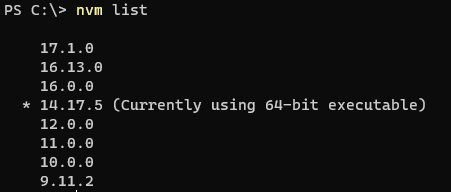
nvm list
Lists the installed versions of node. The selected version is shown with ‚*‘
nvm list available
Shows a list of available Node versions to download

nvm install <version>
This command lets you install different Node versions. To download the latest version just use: nvm install latest.
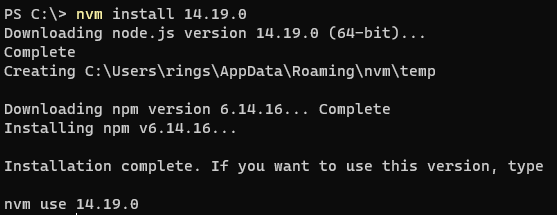
nvm use <version>
Specify what version of Node to use.

And if you want to see a list of all the commands available just enter NVM in cmd to list them all:
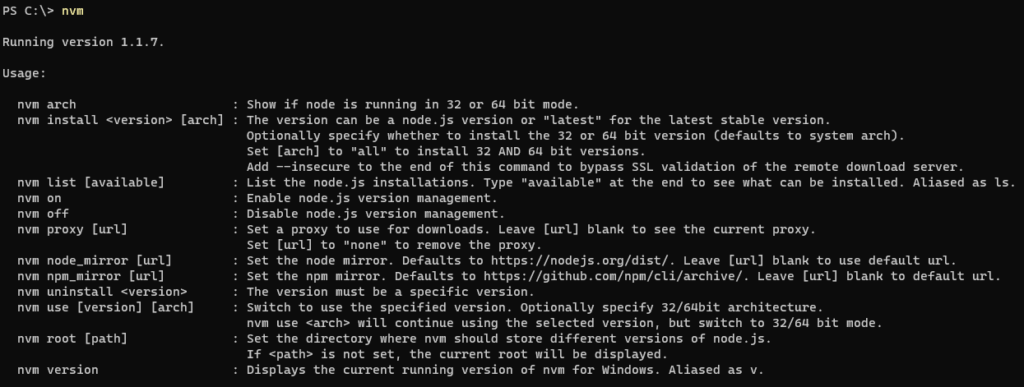
Now if you’re a .net developer like me and use Visual Studio daily, there can sometimes be an issue with Visual Studio not using the Node version specified by NVM.
The fix I found that works for me:
In Visual Studio, go to Tools -> Options -> search for ‚external web tools‘ in the searchbar.
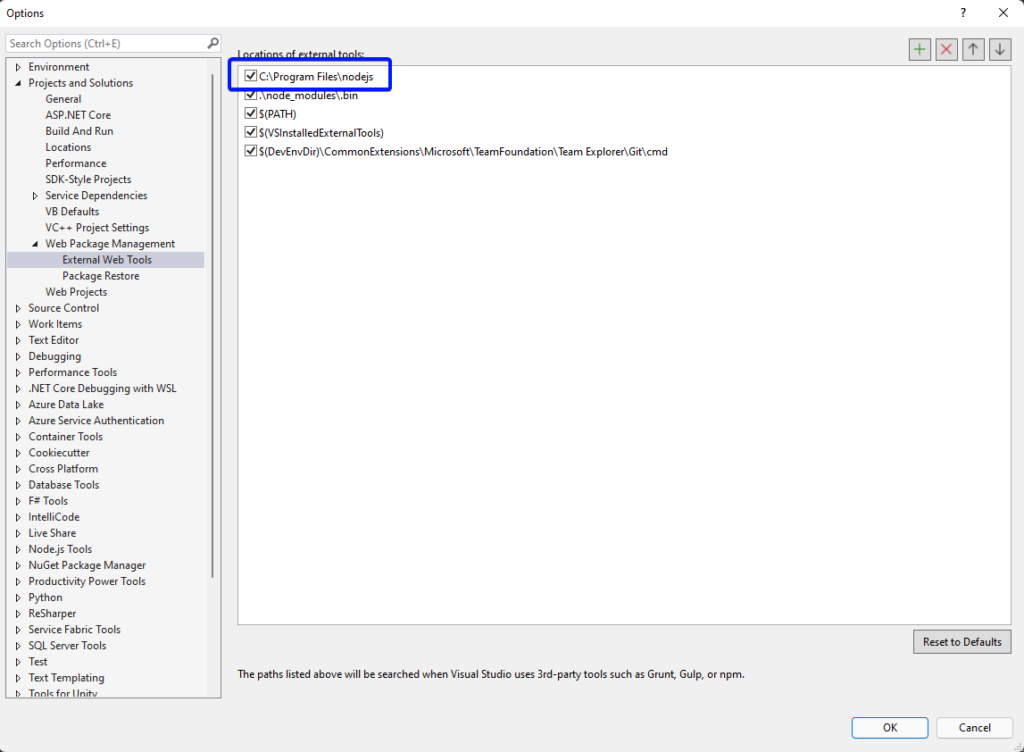
As shown in the image add the path to the folder where Node.js is installed to the top of the list. Usually this is C:\Program Files\nodejs
Most likely it will work now.
Nützliche Kommandos für NVM:
// check version
node -v || node --version // list locally installed versions of node
nvm ls // list remove available versions of node
nvm ls-remote // install specific version of node
nvm install 18.16.1 Code-Sprache: CSS (css)// set default version of node
nvm alias default 18.16.1 Code-Sprache: CSS (css)// switch version of node
nvm use 20.5.1 Code-Sprache: CSS (css)// install latest LTS version of node (Long Term Support)
nvm install --lts // install latest stable version of
node nvm install stableOpera speichert keine Kennwörter

- Auf dem Mac die Schlüsselbundverwaltung öffnen.
- Links auf Anmeldung gehen
- Tab Passwörter
- nach Opera suchen
- Den Eintrag Opera Safe Storage löschen
- Opera neu starten
- Wichtig: Im Passwortmanager in den Opera-Einstellungen muss die Option „Sichern von Passwörtern anbieten“ aktiviert sein
PHP 8 Codeanpassungen

Return type of ... should either be compatible with ...Code-Sprache: JavaScript (javascript)Entweder, wenn der Returntype variiert über die Methode die Annotation #[\ReturnTypeWillChange] einfügen oder die Signatur, speziell meistens den Rückgabewert anpassen.
Deprecated: Creation of dynamic property DefaultBehaviour::$nonExistingProp is deprecatedCode-Sprache: PHP (php)Ab PHP 8.2 sind dynamische Klasseneigenschaften deprecated und Klassen damit versiegelt. Sollte das dennoch benötigt werden, muss über der Klasse die Annotation #[AllowDynamicProperties] angegeben werden.
Function utf8_encode() is deprecatedCode-Sprache: PHP (php)Diese Funktion ist zu ersetzen durch mb_convert_encoding($string, 'UTF-8', 'ISO-8859-1');
Function utf8_decode() is deprecatedCode-Sprache: PHP (php)Diese Funktion ist zu ersetzen durch mb_convert_encoding($string, 'ISO-8859-1', 'UTF-8');
Bildsequenzer

ScrollView scrollt nicht in RNWeb
Um die ScrollView auch im Web scrollbar zu machen, brauche diese eine feste Höhe.
Dafür am besten folgendes:
let scrollHeight = null;

if (Platform.OS === 'web') {
    scrollHeight = { height: Dimensions.get('window').height - 300 }
}

<ScrollView style={scrollHeight}>
 ...
</ScrollView>Code-Sprache: JavaScript (javascript)Github + SSH Key Authentifizierung
SSH keypair setup for GitHub (or GitHub/GitLab/BitBucket, etc, etc)
Create a repo.
Make sure there is at least one file in it (even just the README.md)
Generate a SSH key pair (private/public):
ssh-keygen -t rsa -C "your_email@example.com"
Code-Sprache: JavaScript (javascript)
or even better:
ssh-keygen -t rsa -b 4096 -C "your_email@example.com"
Code-Sprache: JavaScript (javascript)
It also possible to use ed25519. There are pros and cons, but personally I’ve had some issues and that is the reason I’ve chosen to stick to 4096 rsa for now.
Copy the contents of the public SSH key
macOS:
pbcopy < ~/.ssh/id_rsa.pub
Code-Sprache: HTML, XML (xml)
GNU/Linux (requires the xclip package):
xclip -sel clip < ~/.ssh/id_rsa.pub
Code-Sprache: HTML, XML (xml)
Windows Command Line:
type %userprofile%\.ssh\id_rsa.pub | clip
Git Bash on Windows / Windows PowerShell:
cat ~/.ssh/id_rsa.pub | clip
Code-Sprache: JavaScript (javascript)
or ofcourse copy it via your favorite editor, cat, or whatever suits your needs 🙂
Copy the public SSH key to GitHub
Copy the contents of the to your SSH keys to your GitHub account settings (https://github.com/settings/keys).
Test the SSH key:
ssh -T git@github.com
Code-Sprache: CSS (css)
Change directory into the local clone of your repository (if you’re not already there) and run:
git remote set-url origin git@github.com:username/your-repository.git
Code-Sprache: JavaScript (javascript)
Now try editing a file (try the README) and then do:
git add -A
git commit -am "Update README.md"
git push
Code-Sprache: HTML, XML (xml)
Add the key to the ssh-agent
ssh-add ~/.ssh/id_rsa
Code-Sprache: JavaScript (javascript)
You should not be asked for a username or password. If it works, your SSH key is correctly configured.