
Der Standardspeicherort ist unter /[User]/Library/Services/
Kategorie: Mac
lsd – LaunchService Deamon mit hoher CPU-Last
Ab und zu tritt auf dem Mac eine sehr hohe CPU-Last durch den LaunchService Deamon (lsd) auf. Das äußert sich durch permanente Lüfteraktivität.
Mit folgendem Befehl kann die LaunchService Datenbank neu aufgebaut werden, falls ein defekt vorliegt, was in den meisten Fällen Abhilfe schafft.
Bash
/System/Library/Frameworks/CoreServices.framework/Frameworks/LaunchServices.framework/Support/lsregister -kill -r -domain local -domain system -domain userLokaler Server über Internet mit Ngrok

Installation
Bash
brew install ngrok/ngrok/ngrokAuthorization Token speichern
Bash
ngrok config add-authtoken [DEIN_NGROK-TOKEN]localhost nach außen mit Google-OAuth Restriction freigeben
Bash
ngrok http http://localhost:3333 --oauth google --oauth-allow-email andre.moerke@gmail.comMac ScreenRecording mit Audio
Mehrere Node Versionen mit NVM
If you’re like me, and switch a lot between different projects, you’ve most likely run across problems with Node.js versions when building the frontend.
That’s a problem we can solve rather easily with NVM.
But first things first, what is NVM?
NVM (Node Version Manager) is a tool for installing and managing different Node versions. All you need to do is install NVM and the versions of Node you need.
How to install and use NVM on Windows
Download the latest version of NVM (nvm-setup.zip) from Github.
Now, extract and install using the .exe file. It’s easy!
For installing on Linux and MacOS I would refer to the readme found on GitHub.
Now that we have NVM installed we can start using it in our terminal of choice.
The commands I use the most:
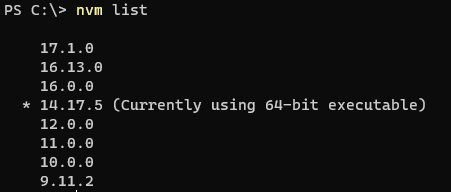
nvm list
Lists the installed versions of node. The selected version is shown with ‚*‘
nvm list available
Shows a list of available Node versions to download

nvm install <version>
This command lets you install different Node versions. To download the latest version just use: nvm install latest.
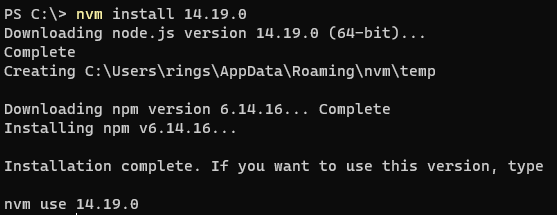
nvm use <version>
Specify what version of Node to use.

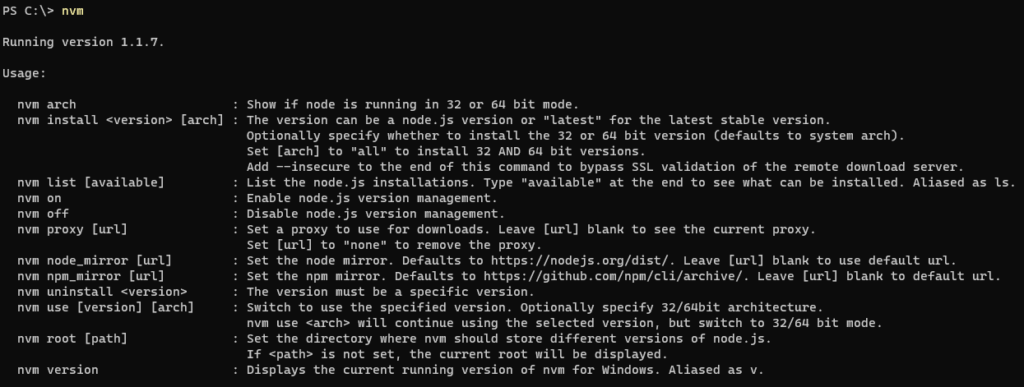
And if you want to see a list of all the commands available just enter NVM in cmd to list them all:
Now if you’re a .net developer like me and use Visual Studio daily, there can sometimes be an issue with Visual Studio not using the Node version specified by NVM.
The fix I found that works for me:
In Visual Studio, go to Tools -> Options -> search for ‚external web tools‘ in the searchbar.
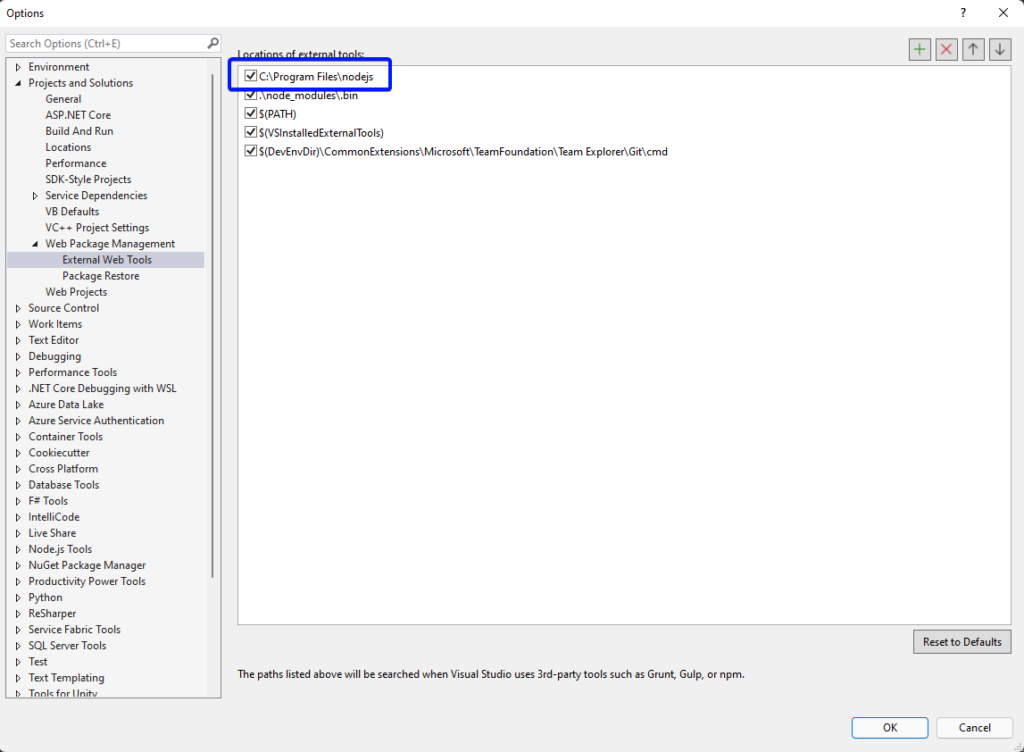
As shown in the image add the path to the folder where Node.js is installed to the top of the list. Usually this is C:\Program Files\nodejs
Most likely it will work now.
Nützliche Kommandos für NVM:
// check version
node -v || node --version // list locally installed versions of node
nvm ls // list remove available versions of node
nvm ls-remote // install specific version of node
nvm install 18.16.1 Code-Sprache: CSS (css)// set default version of node
nvm alias default 18.16.1 Code-Sprache: CSS (css)// switch version of node
nvm use 20.5.1 Code-Sprache: CSS (css)// install latest LTS version of node (Long Term Support)
nvm install --lts // install latest stable version of
node nvm install stableMAC – VPN automatisch verbinden
- SkriptEditor öffnen
- Folgendes Skript eingeben
on idle
	try
		do shell script "ping -oQ -t2 8.8.4.4"
		do shell script "networksetup -connectpppoeservice 'NAME_DER_VPN_VERBINDUNG'"
	on error
		return 8
	end try
	return 60
end idleCode-Sprache: JavaScript (javascript)- Exportieren
- Dateiformat App

- Unter Systemeinstellungen > Allgemein > Anmeldeobjekte über + das Programm hinzufügen
Mac Systemtasten funktionieren nur mit fn-Taste
- Wähle auf deinem Mac Menü „Apple“
 > „Systemeinstellungen“ und klicke auf „Tastatur“
  in der Seitenleiste. (Du musst möglicherweise nach unten scrollen.)
 - Klicke rechts auf „Tastaturkurzbefehle“ und dann auf „Funktionstasten“ in der Liste links.
- Aktiviere die Option „Die Tasten F1, F2 usw. als Standard-Funktionstasten verwenden“ oder „Die Tasten F1, F2 usw. als Standard-Funktionstasten auf externen Tastaturen verwenden“ (je nach Mac-Modell).
Mac NumPad funktioniert nicht
Unter Bedienungshilfen > Tastaturmausbedienung deaktivieren
iOS Simulator – Video aufnehmen
xcrun simctl io booted recordVideo appVideo.movCode-Sprache: CSS (css)React Native / VSCode findet XCode Command Line Tools nicht
- ) Xcode öffnen
- ) Preferences öffnen
- ) Locations-Tab öffnen
- ) Xcode Version auswählen in „Command Line Tools“